Migrating from Keepass XC to a self hosted Vaultwarden instance
I think self hosting your own password manager is one of the best decisions you can make for protecting yourself digitally. We have seen password manager platforms suffer data breaches that ended up hurting the users they were supposed to protect.
My old setup stored a local KeepassXC database on my workstation and on my Pixel 9a, synced with Syncthing. The problem was merge conflicts during the sync process. I got tired of resolving them, so I decided to move to a single database hosted on my homelab using Vaultwarden, with backups going to my Hetzner storage box and an external drive.
Why Vaultwarden
Vaultwarden is a lightweight self hosted server that is compatible with the official Bitwarden clients. That means no more merge conflicts, the server handles the syncing instead of Syncthing.
Requirements:
- Docker with the compose plugin
- Tailscale on the server and on every device that needs access
- HTTPS enabled on tailnet
Docker setup
First I created the directory and the compose file.
frankie@homelab:~$ mkdir -p docker/vaultwarden
frankie@homelab:~$ cd docker/vaultwarden
frankie@homelab:~/docker/vaultwarden$ nano compose.yaml
Here is my compose.yaml:
services:
  vaultwarden:
    image: vaultwarden/server:latest
    container_name: vaultwarden
    restart: always
    environment:
      DOMAIN: "https://vaultwarden.your-tailnet.ts.net"
      SIGNUPS_ALLOWED: "true" # set to false after creating your account
    volumes:
      - ./vw-data:/data # the path before the : can be changed
    ports:
      - "11001:80" # you can replace 11001 with your preferred port
The DOMAIN variable matters. The web vault refuses to work over plain HTTP because browsers only allow the crypto APIs it needs on HTTPS or localhost. DOMAIN tells Vaultwarden the exact URL you will use to reach it.
Start the container:
frankie@homelab:~/docker/vaultwarden$ docker compose up -d
HTTPS with Tailscale
I access my homelab over Tailscale anyway, so I used a Tailscale Service to get a proper HTTPS name and certificate without exposing anything to the public internet.
First I created the service in the admin console on the Services page. I named it vaultwarden and set the endpoint to tcp:443. The service gets its own name and IP: vaultwarden.my-tailnet.ts.net.
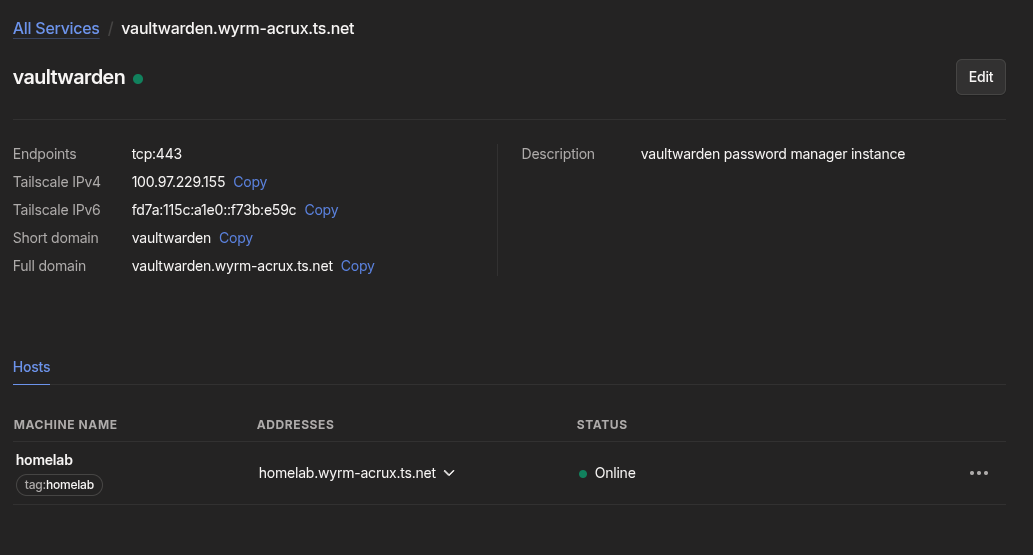
Service hosts must be tagged devices, so I also had to tag the server. In Access Controls I added the tag owner:
"tagOwners": {
    "tag:homelab": ["autogroup:admin"]
}
Then on the homelab I re-authenticated with the tag:
sudo tailscale up --advertise-tags=tag:homelab --accept-dns=false --advertise-routes=192.168.1.0/24
One thing that tripped me up: tailscale up makes you repeat any non default flags you already had set, which is why the subnet route and DNS flags are in there.
Next I pointed the service at the container:
sudo tailscale serve --service=svc:vaultwarden --https=443 http://127.0.0.1:11001
After approving the host in the admin console, tailscale serve status showed the service live, and https://vaultwarden.wyrm-acrux.ts.net loaded the web vault with a valid certificate. Tailscale provisions the cert automatically, there is nothing else to configure.
Creating the account and locking it down
I opened the web vault, created my account, then set SIGNUPS_ALLOWED back to "false" in the compose file and recreated the container:
frankie@homelab:~/docker/vaultwarden$ docker compose up -d --force-recreate
Migrating from KeePassXC
In KeePassXC: Database > Export > CSV. Save the file somewhere local only. It contains every password in plain text, so treat it accordingly.
In the Vaultwarden web vault: Settings > Import data, select "KeePassX (csv)" as the format, and upload the file.
Two things to know:
- TOTP secrets do not survive the CSV export. I re-added those by hand from my old database.
- Securely delete the CSV after you confirm everything imported correctly. It is plain text.
I kept the KeePassXC database around untouched for a couple of weeks as a fallback before deleting it.
Clients
On the Bitwarden browser extension and mobile app, choose the self hosted option before logging in and set the server URL to https://vaultwarden.your-tailnet.ts.net. Every device that needs access also needs to be on the tailnet.
Backups
Everything Vaultwarden needs lives in the ./vw-data directory, so backups are simple. I use restic to push snapshots to my Hetzner storage box and an external drive. That setup deserves its own post.
Closing thoughts
The merge conflicts are gone, and I can reach my vault from any of my devices. Moving from an offline database file to a self hosted server is a tradeoff, since the server is now something I have to maintain and protect. But with it sitting behind Tailscale and not exposed to the public internet, it is a tradeoff I am comfortable with.